
Hello guys,

Adding Bash to my bug bounty workflow was one of the most useful steps in my learning process.
Tables of Content:
- Introduction
- Subdomain Enumeration
- Subdomain Takeovers
- CORS Misconfiguration
- Resources
Let's start with the basics.
What's Bash? (The first question comes.)
Bash - Bourne Again Shell
Bash is an intuitive, flexible shell commonly used on Linux and macOS. It lets you interact with the operating system and execute commands programmatically.
To learn more, this Bash cookbook covers the language in greater depth:
Bash Cookbook for Everyone - Part 1
Now Why Bash and Bug Bounties together?
Many security tools automate tasks you already perform, often much faster. When the tool you need does not exist, write one.
So, Lets Start
I know GUIs are nice and interactive but are not fast.
Majorly Used Commands in bash during Bug Bounty
cat - concatenate files
tee - copy stdin to a file and to the screen
sort - sort the lines from stdin
Julia Evans on Twitter
sort & uniq
uniq - Remove duplicate lines from stdin
xargs - run a command using each line from stdin as an argument
awk - general purpose text-processing language
Julia Evans on Twitter
awk
grep - search for patterns in files or stdin
Julia Evans on Twitter
grep
find - list files recursively and apply filters
Julia Evans on Twitter
find
sed - edit the input stream
Julia Evans on Twitter
sed
Now let's do Some Recon with the Help of BASH
Subdomain Enumeration
- One-liner to find the subdomains:
while read sub; do if host "$sub.example.com" &> /dev/null; then echo "$sub.example.com"; fi; done < subdomains_wordlist.txt
~tomnomnom
2. Automating Stuff with the help of tools:
Note: these tools should be already installed in your system
Check out my previous blog post to install and use all the tools
##!/bin/bash
#starting assetfinder
assetfinder --subs-only $1 | tee -a domains.txt
#starting amass
amass enum --passive -d $1 -o domains
#removing duplicate entries
sort -u domains -o domains
#filtering the domains
cat domains | filter-resolved | tee -a domains.txt
rm domains
#checking for alive domains
echo "\n\n[+] Checking for alive domains..\n"
cat domains.txt | ~/go/bin/httprobe | tee -a alive.txt
Save the above script with subenum.sh and give it executable permission
chmod +x subenum.sh
In the above script, we have used amass and assetfinder for subdomain enumeration, then sort to remove the duplicate entries after it I have used filter-resolved (another get tool by tomnomnom) to resolve the domains and to check how many domains are actually alive, for that we have used a tool called httprobe by tomnomnom and saved the alive domains in a different file called alive.txt.
Next Comes Subdomain Takeover
It starts with checking the CNAME of subdomains
host -t CNAME subdomain.example.com
Having a lot of targets to scan.
Checking every subdomain manually takes time.
The following one-liner shortens that process:
One Liner to do it is:
cat domains.txt | xargs -n 1 -I{} host -t CNAME {}
For speeding things up pipes give you some parallelization for free and xargs can run things in parallel
Next, We'll Build a Script to Find CORS Misconfigurations
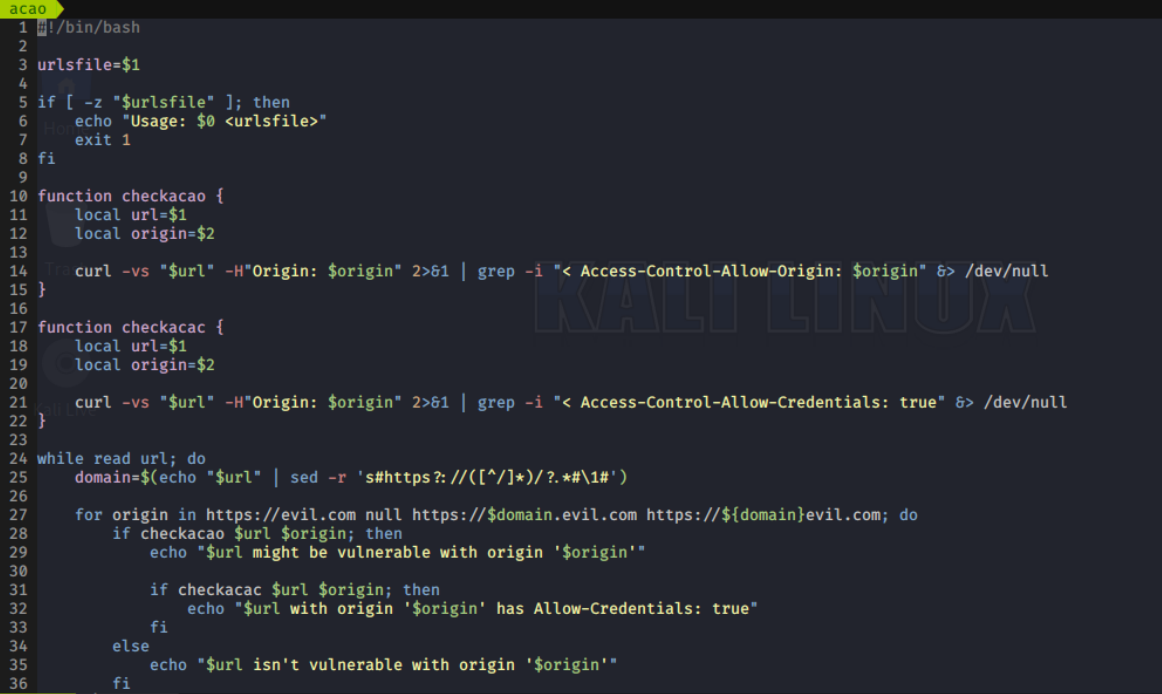
So this is the easiest way to find the CORS misconfiguration
You can download this script from here: https://raw.githubusercontent.com/tomnomnom/dotfiles/master/scripts/acao
Give it executable permission by chmod and run it:
./acao <subdomain_filename>
More Resources
- Fasten your Recon process using Shell Scripting
- tomnomnom/dotfiles
- Ten Things I Wish I'd Known About bash
- explainshell.com - match command-line arguments to their help text
- nahamsec/recon_profile
Best of luck everyone. Keep-Hacking!
Feedback and corrections are welcome.
If this article helped, share it with another researcher who might find it useful.
From research to a scoped assessment.
Explore Current penetration testing guides or browse the full Bug Bounty Archive for more evidence-focused research.
Research topics: automation / bug-bounty / hacking / bash