Hello hunters, In this blog, I will help you setup-up Autozie and Autorepeater to find IDORs with the help of Burp Suite, but first a little detail about What is IDOR?

What is Insecure Direct Object Reference?
The fourth one on the list is Insecure Direct Object Reference, also called IDOR. It refers to when a reference to an internal implementation object, such as a file or database key, is exposed to users without any other access control. In such cases, the attacker can manipulate those references to get access to unauthorized data.
for more: blog.detectify.com
Now, Let's begin the Hacking!
You can Install Autorize and Autorepeater from the Bapp store in Extender tab
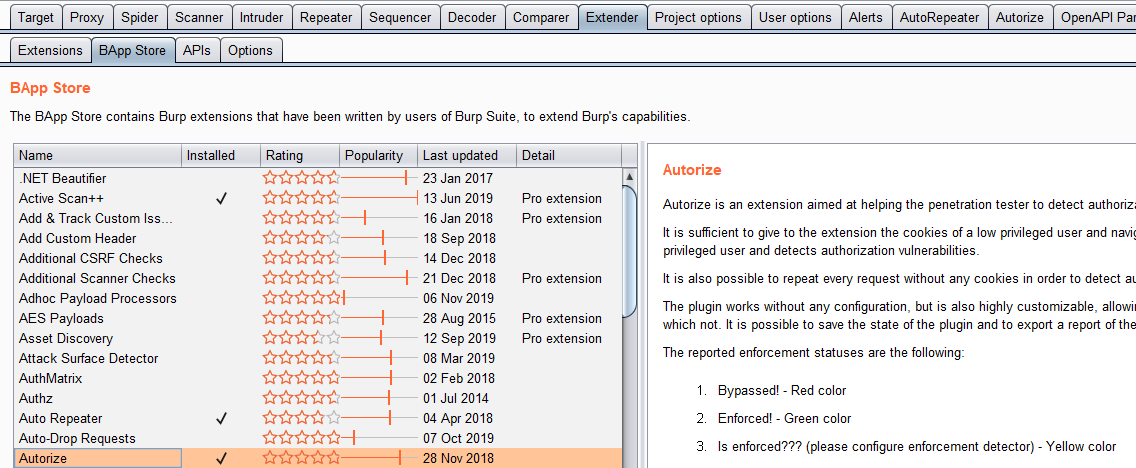
For more details about the tools, you can check it on Github
Autorize — For Each Request you do, it will send an equal request But with changed cookies of the session or any additional header used for authorization.
So, let’s see how it works…
USER A — Admin
USER B — Normal User
Browse the Web App with User A and Add the cookie of User B in the autorize so that it can browse with the User B account automatically.
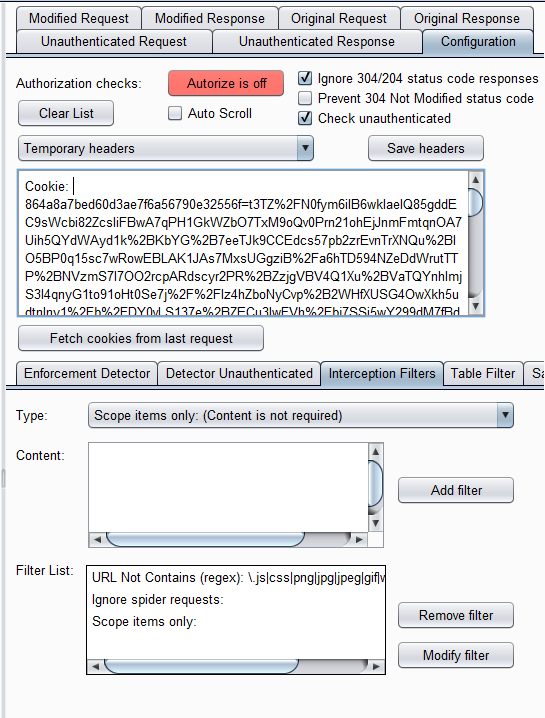
Add the scope filter so that we can get good/healthy results as clear as possible and we can avoid getting garbage results on our little screen.
Turn ON the Autorize and surf the WebApp with User A and requests with start flowing through autorize

As in the above image you can see, I’ve added the cookie of User B and suffering the web app with User A and there are no changes the Original length and Modified length with 200 OK status code so there can be the possibility of IDOR.
If you get 403 Forbidden error on the Modified length then there is No IDOR possibility and that’s a NO GO
Just browse through the WebApp and try each and every Functionality which has Admin privileges and can’t be accessed by Normal User, if you get 200 Ok on that request it’s an IDOR Vulnerability.
So Auditing the Request is upto you.
Now, How to Play Smart and Not to Work More.
Just Check the previous parameter on which requests have been sent and you didn’t find them vulnerable.
Go to the HTTP History tab in the Proxy Section and put the previous request out of scope. So now when you will crawl the web app, those parameters will not be listed in the Autorize section. So now, each request is a new Request.
Taking care of yourself is good…
Playing with Autorepeater
GitHub - nccgroup/AutoRepeater: Automated HTTP Request Repeating With Burp Suite
This a just a complicated version of Autorize, which is used for more precise and specific results.
Example — uuid, suid, uid, etc.
Like changing the uuid of a user everytime manually can be a bit difficult.
Combining these two can check the functionality not only inside tenant but also a cross tenant at the same time.
~@Regala_

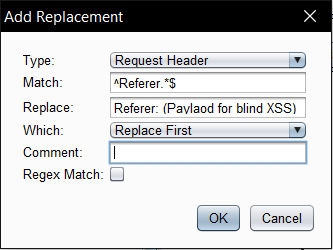
In the above image by clicking on Add under Replacement you can add the request string to change with your required replace string and also select replace all and click OK.
It can also be used to change other Requests like:
- User = Admin
- False = True
- JSON = XML
Best of luck everyone. Keep-Hacking!
Feedbacks and edits are welcome
If you enjoyed this blog, please click the 👏 button and share to help others find it.
Reference
https://www.youtube.com/watch?v=3K1-a7dnA60&t=357s
Thanks to Stok for making an Amazing tutorial video with Fisher
From research to a scoped assessment.
Explore API penetration testing or browse the full Bug Bounty Archive for more evidence-focused research.
Research topics: hacking / burpsuite / idor / bug-bounty / hetroublemaker